Project Back

Azure AutoML vs. Custom Model Development

Date: 2024-01-01

Compared Azure AutoML with a custom Jupyter-based modeling workflow for shipping-cost prediction, focusing on tradeoffs in speed, control, and model quality.

Project 7 visuals 2024
Azure AutoML vs. Custom Model Development
Azure AutoML vs. Custom Model Development Project overview
Azure AutoML vs. Custom Model Development

Predicting Shipping Cost: A Comparison Between Azure AutoML and Jupyter Notebook Developed Code

This project compares two approaches to a regression problem: using Azure AutoML and building a custom workflow in Jupyter Notebook code. The use case was shipping-cost prediction, with the goal of understanding where automated machine learning is most useful and where hand-built development still provides an advantage.

Azure AutoML is attractive because it speeds up experimentation, automates model selection and tuning, and lowers the barrier to building usable models. At the same time, custom notebook-based workflows provide more direct control over preprocessing, feature engineering, validation, interpretability, and experimental design. This project was framed around that tradeoff.

The underlying dataset focused on shipping costs for art and collectible objects, where price is influenced by dimensions, weight, materials, shipping mode, distance, and service options. That makes it a practical setting for comparing automated and manual modeling approaches because the target is real-valued, the feature set is mixed, and the business context is easy to understand.

Rather than treating AutoML as a replacement for data science, this project treats it as a benchmark and productivity tool. The comparison is useful for understanding when a faster automated workflow is sufficient and when custom development is justified.

How Azure AutoML works

Based on Microsoft’s definition, Azure AutoML is Empower professional and nonprofessional data scientists to build machine learning models rapidly. Automate time-consuming and iterative tasks of machine learning model development using breakthrough research and accelerate time to market [link].

This ML tool has a wide range of capabilities and the majors of them are:

Automatically build and deploy predictive models using the no-code UI or the SDK

Automatically build and deploy predictive models using the no-code UI or the SDK

Support a variety of automated machine-learning tasks

Support a variety of automated machine-learning tasks

Increase productivity with easy data exploration and intelligent feature engineering using deep neural networks

Increase productivity with easy data exploration and intelligent feature engineering using deep neural networks

Build models with transparency and trust in mind using responsible machine-learning solutions

Build models with transparency and trust in mind using responsible machine-learning solutions

AutoML solutions can target various stages of the machine-learning process. These are the different steps that can be automated [link]:

Data preparation and ingestion (from raw data and miscellaneous formats)

Data preparation and ingestion (from raw data and miscellaneous formats)

Column type detection; e.g., boolean, discrete numerical, continuous numerical, or text

Column type detection; e.g., boolean, discrete numerical, continuous numerical, or text

Column intent detection; e.g., target/label, stratification field, numerical feature, categorical text feature, or free text feature

Column intent detection; e.g., target/label, stratification field, numerical feature, categorical text feature, or free text feature

Task detection; e.g., binary classification, regression, clustering…

Task detection; e.g., binary classification, regression, clustering…

Featurization

Featurization

Feature engineering

Feature engineering

Feature extraction

Feature extraction

Feature selection

Feature selection

Meta-learning and transfer learning

Meta-learning and transfer learning

Detection and handling of skewed data and/or missing values

Detection and handling of skewed data and/or missing values

Handling of imbalanced data

Handling of imbalanced data

Model selection

Model selection

Hyperparameter Optimization of the learning algorithm

Hyperparameter Optimization of the learning algorithm

Pipeline selection under time, memory, and complexity constraints

Pipeline selection under time, memory, and complexity constraints

Selection of evaluation metrics and validation procedures

Selection of evaluation metrics and validation procedures

Problem checking

Problem checking

Leakage detection

Leakage detection

Misconfiguration detection

Misconfiguration detection

Monitoring

Monitoring

Explainability

Explainability

Analysis of the results obtained

Analysis of the results obtained

Deployment

Deployment

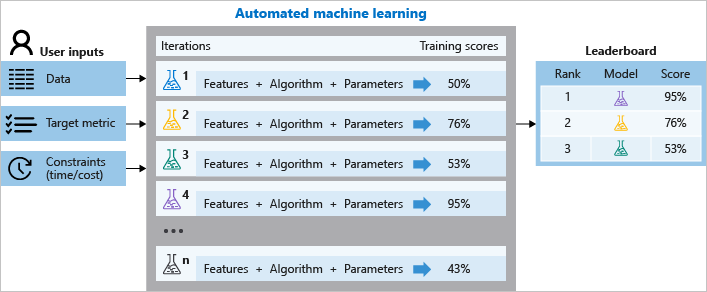
During training, Azure Machine Learning creates a number of pipelines in parallel that try different algorithms and parameters for you. The service iterates through ML algorithms paired with feature selections, where each iteration produces a model with a training score. The better the score for the metric you want to optimize for, the better the model is considered to “fit” your data. It will stop once it hits the exit criteria defined in the experiment.

Any Need for Data Science Jobs in the Future?

Altogether, AzureML improves productivity within the studio, the development experience that supports all ML tasks to build, train and deploy models. It collaborates with Jupyter Notebooks using built-in support for popular open-source frameworks and libraries. One of the major factors is how it creates accurate models quickly with automated ML, using feature engineering and hyperparameter-sweeping capabilities. AzureML accesses the debugger, profiler, and explanations to improve model performance as you train and also uses deep Visual Studio Code integration to go from local to cloud training seamlessly and autoscale with powerful cloud-based CPU and GPU clusters [link].

Experiment: shipping price prediction

It can be difficult to navigate the logistics when it comes to buying art. These include, but are not limited to, the following:

Effective collection management

Effective collection management

Shipping the paintings, antiques, sculptures, and other collectibles to their respective destinations after purchase

Shipping the paintings, antiques, sculptures, and other collectibles to their respective destinations after purchase

Though many companies have made shipping consumer goods a relatively quick and painless procedure, the same rules do not always apply while shipping paintings or transporting antiques and collectibles.

Data Description

Customer Id:Represents the unique identification number of the customers

Customer Id:Represents the unique identification number of the customers

Artist Name:Represents the name of the artist

Artist Name:Represents the name of the artist

Artist Reputation:Represents the reputation of an artist in the market (the greater the reputation value, the higher the reputation of the artist in the market)

Artist Reputation:Represents the reputation of an artist in the market (the greater the reputation value, the higher the reputation of the artist in the market)

Height:Represents the height of the sculpture

Height:Represents the height of the sculpture

Width:Represents the width of the sculpture

Width:Represents the width of the sculpture

Weight:Represents the  weight of the sculpture

Weight:Represents the  weight of the sculpture

Material:Represents the material that the sculpture is made of

Material:Represents the material that the sculpture is made of

Price Of Sculpture:Represents the price of the sculpture

Price Of Sculpture:Represents the price of the sculpture

Base Shipping Price:Represents the base price for shipping a sculpture

Base Shipping Price:Represents the base price for shipping a sculpture

International:Represents whether the shipping is international

International:Represents whether the shipping is international

Express Shipment:Represents whether the shipping was in the express (fast) mode

Express Shipment:Represents whether the shipping was in the express (fast) mode

Installation Included:Represents whether the order had installation included in the purchase of the sculpture

Installation Included:Represents whether the order had installation included in the purchase of the sculpture

Transport:Represents the mode of transport of the order

Transport:Represents the mode of transport of the order

Fragile:Represents whether the order is fragile

Fragile:Represents whether the order is fragile

Customer Information:Represents  details about a customer

Customer Information:Represents  details about a customer

Remote Location:Represents whether the customer resides in a remote location

Remote Location:Represents whether the customer resides in a remote location

Scheduled Date:Represents the date when the order was placed

Scheduled Date:Represents the date when the order was placed

Delivery Date:Represents the date of delivery of the order

Delivery Date:Represents the date of delivery of the order

Customer Location:Represents the location of the customer

Customer Location:Represents the location of the customer

Cost:Represents the cost of the order

Cost:Represents the cost of the order

Set Up the Scene in Azure AutoML

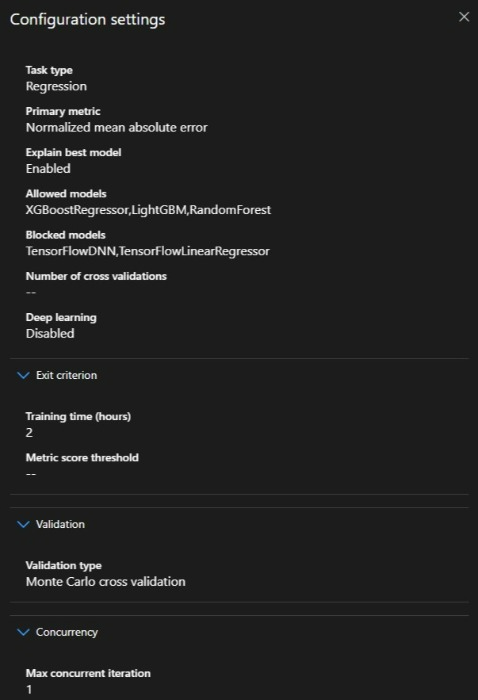
We import the above dataset to perform a regression problem in Azure AutoML. At the same time, we develop our own notebook to solve the problem. We set the metric as Normalized mean absolute error in AutoML, however, we could get all metrics via the model result upon completion.

We set the models as XGBoostRegressor, LightGBM, and RandomForest based on these models well-performed on other price predictions in other models.

The training hours were set to two hours as the runtime of the Jupiter notebook we performed. However, AutoML could perform better for a longer time, and also the generated notebook also could take more time via GridSearch of the parameters.

The validation is set to auto although we could choose between k-fold- Monte Carlo Cross-validation (picked by the AutoML).

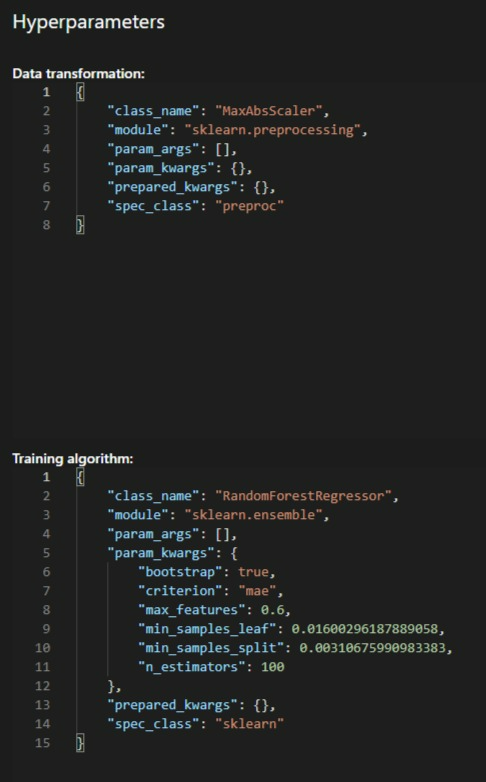
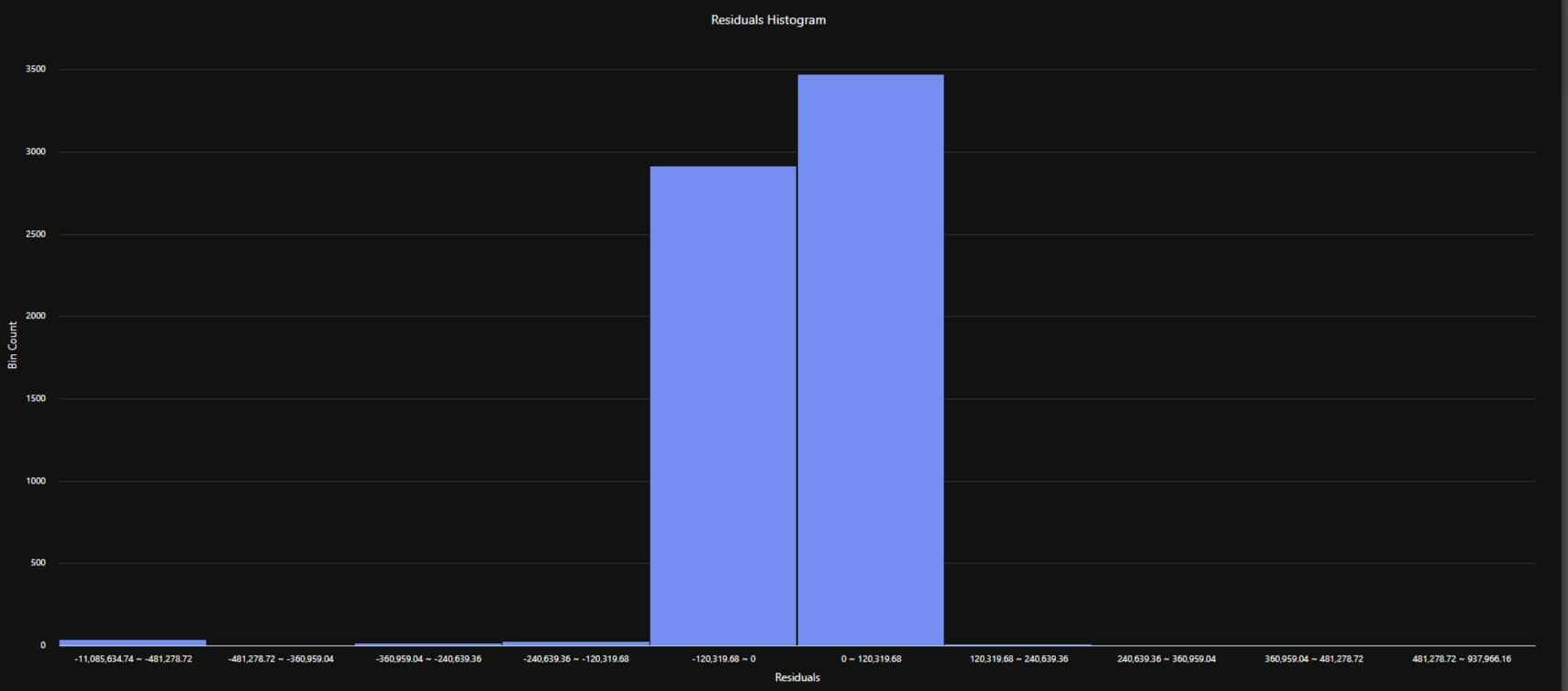
Residuals and validation plots are shown below and it could see the model is not performed very well. However, we should consider the dataset is not optimized and need extensive feature engineering to get a good result.

Let compare the results with a designed Jupiter notebook project and see which one is comparatively could perform better.

Conclusions

By comparing the results we could see the generated Jupyter notebook (human supervision) has a better performance on modeling and hyper tuning and making pipelines. However, as expected Azure AutoML has a relatively simple data injecting to modeling and pipeline production. The lower performance on Azure AutoML is negligible comparing all other benefits Azure services and studios provide for us and on a broader scale for Enterprises.

Building and testing a model is fairly simple in Azure AutoML. However, to get the best result, a data scientist or a team of data scientists that has a deep, fundamental and statistical knowledge of machine learning should supervise the Azure AutoMl and with other Azure capabilities like Designer, pipeline, Azure Cognitive Services (ACS), Azure Kubernetes Service (AKS), the performed model via Azure could reach and save significant benefits for the businesses. We should consider that it requires knowledge of the characteristics of machine learning algorithms, and certainly will not develop new ones automatically. But it does provide an environment where machine learning could be used effectively without low-level implementation of algorithmic knowledge. So, it can be concluded on the note that AzureML will not end the future of data science but it would rather improve the working process with its advanced features.