Project Back

Artificial Intelligence and Power Platform Automation

Date: 2024-01-01

Designed an OCR-driven reporting workflow using Azure AI Document Intelligence, Power BI, Power Apps, and Power Automate to replace manual document processing.

Project 14 visuals 2024
Artificial Intelligence and Power Platform Automation
Artificial Intelligence and Power Platform Automation Project overview
Artificial Intelligence and Power Platform Automation

Artificial Intelligence and Power Platform Automation for Scanned Document Parsing and Reporting

This project automated the processing of annual solid waste and recycling reports that were previously handled manually. Contractors submitted nine-page scanned forms, and staff had to extract the values into spreadsheets, validate them, and prepare reports for management. The manual process consumed significant staff time and introduced frequent data-entry errors.

The solution combined Azure AI Document Intelligence, Python-based validation logic, Power BI, Power Apps, and Power Automate into one workflow. OCR was used to extract report fields from submitted scans, custom logic was added to assess confidence at a more usable level, Power BI highlighted exceptions and anomalies, and Power Apps allowed staff to correct values directly when review was needed.

The project was especially valuable because high OCR confidence alone was not enough to guarantee good operational data. Some errors came from poor scans, some came from misaligned table entries, and others came from users entering values in the wrong place or inventing their own categories. The broader system was therefore designed not just to extract data, but to support review, outlier detection, and exception handling.

At a portfolio level, this is a business intelligence and workflow automation case study: replacing a repetitive manual process with a reviewable, end-to-end pipeline that improves accuracy, visibility, and reporting speed.

Context and problem

The brainstorming process kicked off with a range of initial solutions, each presenting its own merits and limitations, which were subsequently presented to the chief department of Solid Waste. Among the proposed solutions were:

Microsoft Forms & Google Forms:Despite their user-friendly interfaces, these platforms lacked the dynamic capability to adapt to changing selection criteria, often resulting in excessively lengthy forms.

Survey Monkey:While offering robust survey functionalities, its county-wide subscription requirement posed a barrier, especially considering the limited tech-savviness of haulers.

Versiform:This internal form-generating tool, utilizing C++ coding, showed promise but necessitated collaboration with other departmental staff. However, its results fell short of providing a high-level solution.

PowerApps:Ideal for internal staff within companies, PowerApps presented access challenges for external contractors, limiting its applicability.

✅Azure AI Document Intelligence (OCR):Leveraging the current form, this solution demonstrated potential in automating document processing through optical character recognition technology, promising a more streamlined approach to data extraction.

One of the Report Pages

Custom Extraction Model in Azure AI Document Intelligence

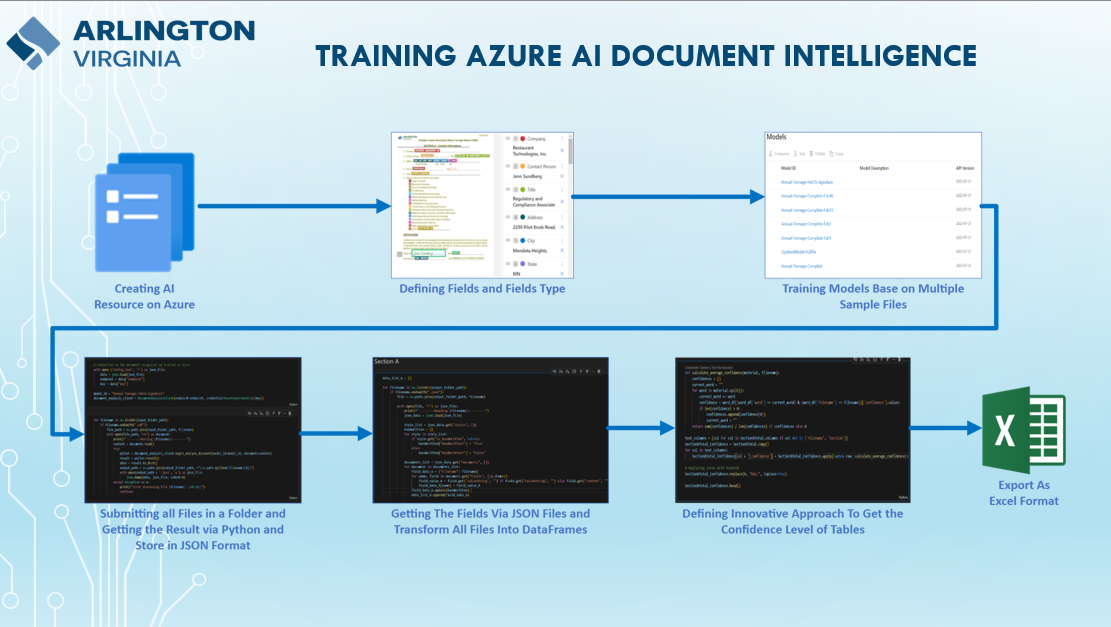
TheAzure AI Document Intelligenceboasts an impressively trained model, particularly user-friendly when utilizing pre-trained models. However, our endeavor required the utilization of a custom extraction model tailored to accommodate the intricacies of thenine-page documents, which often exhibited variations among haulers. A notable challenge emerged when certain haulers neglected to fill or scan sections of the form that didn’t apply to them, complicating the extraction process significantly.

In a strategic move to optimize resources, we opted for a cost-effective approach by submitting all files and retrieving results inJSON formatvia Python. Yet, our initial hurdle arose when the model encountered numerous tables, hindering Azure AI Document Intelligence’s ability to provide confidence scores for accurate field identification. This limitation posed a considerable obstacle, prompting us to devise an innovative solution. Recognizing that Azure DI provides confidence scores for individual words, we engineered a novel Python function to calculate the average confidence score for consecutive words constituting a cell string. This breakthrough empowered us to overcome the challenge, enabling us to pinpoint areas requiring further review with precision. Subsequently, in the validation phase of our project, this methodology proved invaluable inflagging confidence discrepancies, facilitating swift resolution through either hauler or staff review of the scanned documents.

Click to See the Field Extraction in GitHub

Validation and reporting workflow

Once we completed the export and manipulation of the data, transforming them into multiple Excel tabs, each representing a distinct section of the report, we seamlessly integrated Power BI into our workflow. Harnessing the power of the Power Query editor, we embarked on an exhaustive journey of data cleaning and transformation to ensure the utmost accuracy in our insights. However, our commitment to precision didn’t end there.

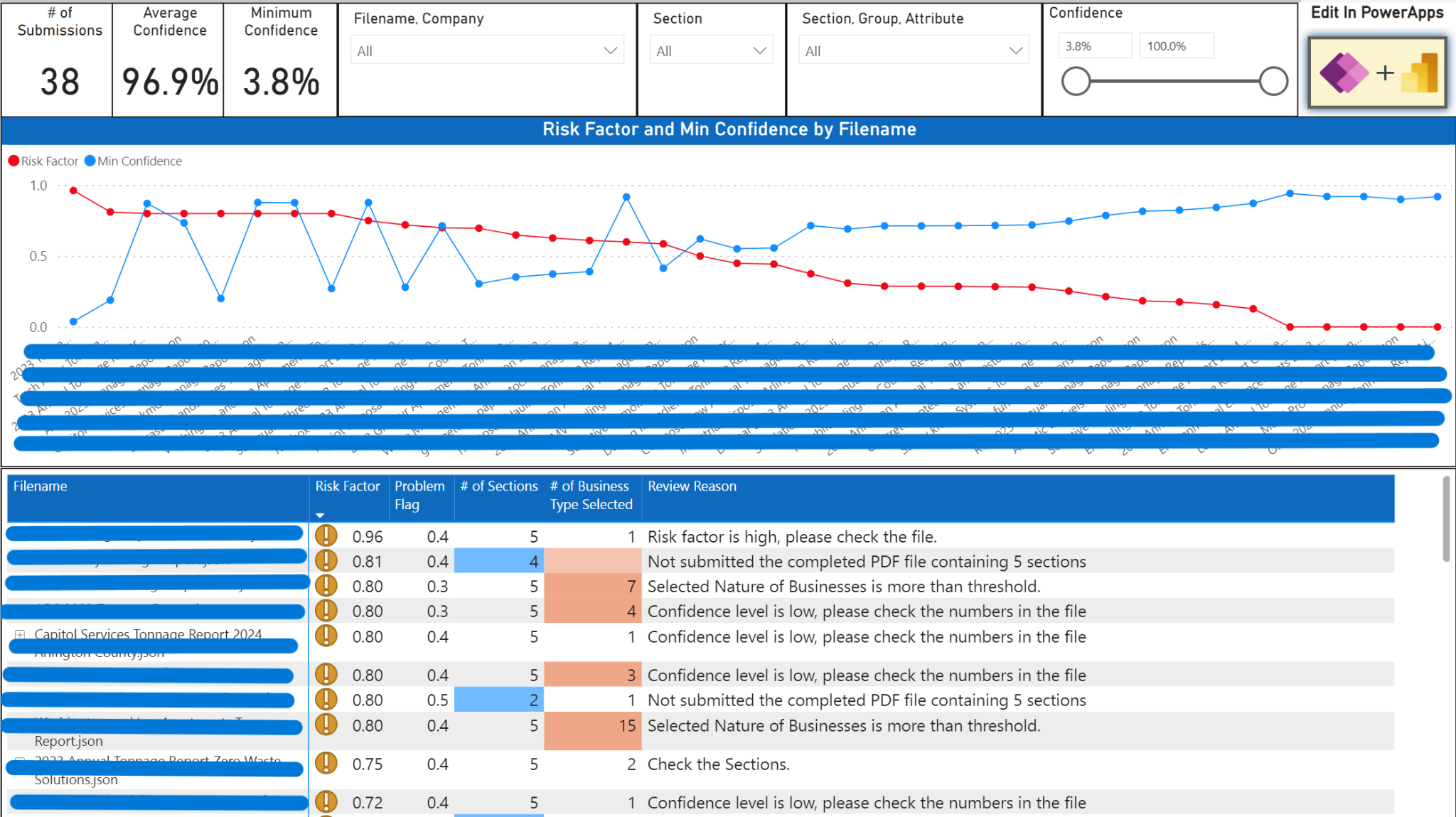
Despite the confidence scores provided by Azure AI Document Intelligence, we recognized the importance of capturing errors that fell outside these scores. For instance, instances wherehaulers incorrectly filledin data adjacent to the correct spot in a table, resulting in misinterpretation of material sections. Additionally, incomplete submissions posed a challenge, leaving us unsure whether the absence of data was intentional or an oversight. To address these nuances, we leveraged Power BI’s robust capabilities to highlight such discrepancies for review by our staff. On the other hand, in some fields values there missing points that makes the numbers so big and we should captureoutliers,in these cases the confidence level returning by Azure DI is high and we can’t only rely on it.

Furthermore, we encountered issues stemming from incorrect form filling practices, such as haulersinputting their own categoriesinstead of adhering to predefined ones. This led to the generation of extraneous columns during our transformation process, complicating data analysis, especially when dealing with files processed as a collective folder. Through meticulous attention to detail and innovative problem-solving, we navigated these challenges, ensuring that our data-driven insights remained accurate and actionable, ultimately driving informed decision-making within the organization.

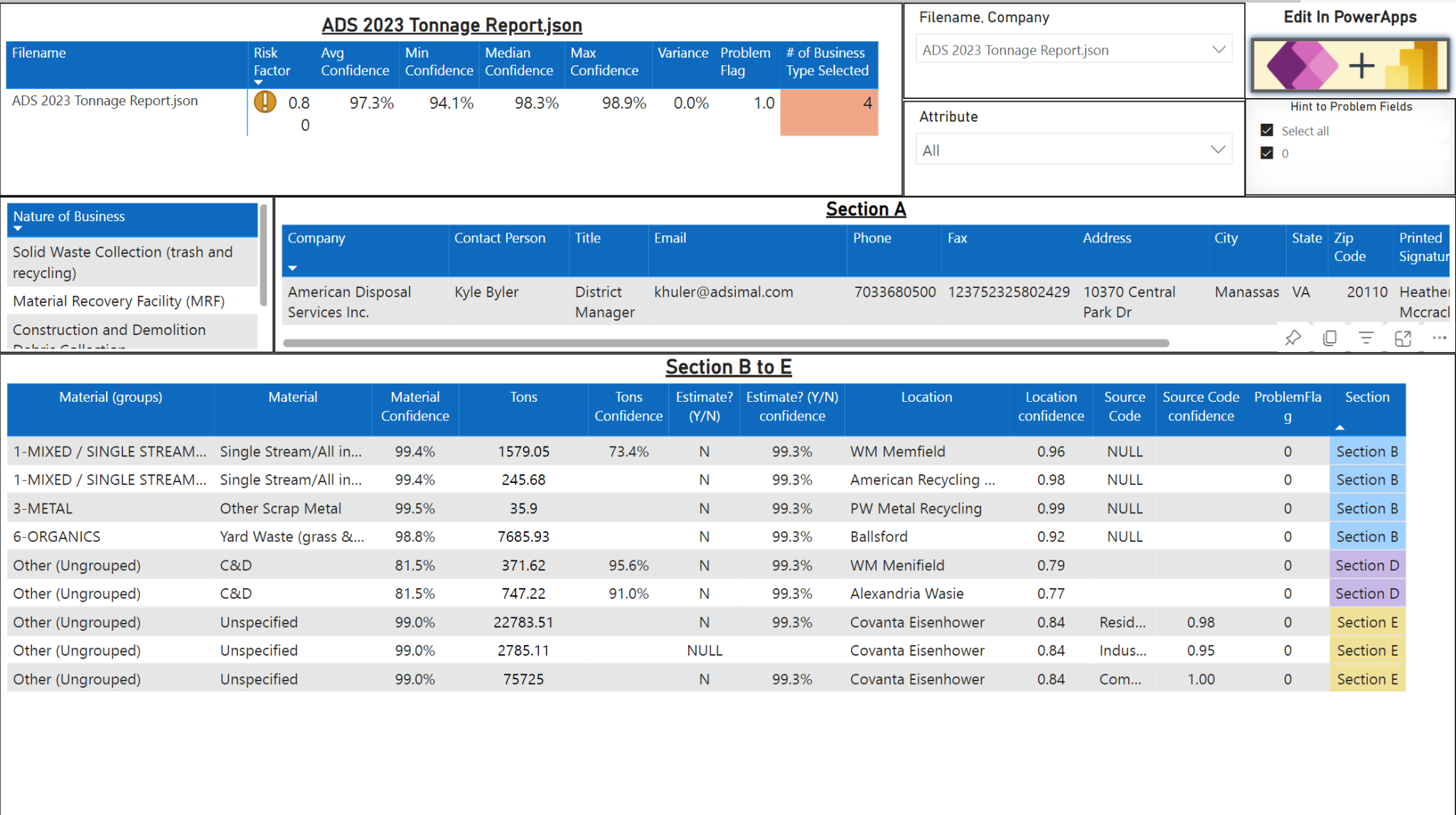
In addressing the aforementioned challenges, our Power BI dashboard was meticulously crafted to provide comprehensive insights and facilitate efficient review processes. We structured the dashboard with a focus on enhancing staff oversight and enabling thorough data examination.

To tackle the issue of identifying errors and inconsistencies, we designedtwo dedicated tabswithin the dashboard. These tabs served as a centralized hub for staff to meticulouslyreview confidence scores and verify data accuracy via PowerApps, ensuring that no detail went unnoticed. Additionally, to streamline the review of aggregated report values, we meticulously curated five tabs, each offering a comprehensive overview of current performance metrics derived from the reports.

Furthermore, recognizing the importance of benchmarking against previous years’ performance, we integrated two tabs dedicated to comparing current hauler performance with historical data. This comparative analysis not only provides valuable insights into trends and patterns but also aids in identifying areas for improvement or commendation.

As part of our ongoing effort to maintain data integrity and operational efficiency, we incorporated proactive measures to address hauler non-compliance. With each new cycle of hauler reports, our dashboard automatically flags non-submissions, prompting staff to follow up with the respective haulers. This proactive approach ensures timely intervention, whether it be to remind haulers of submission deadlines or to ascertain their market status.

Through the seamless integration of data visualization and proactive monitoring features, our Power BI dashboard empowers staff with the tools they need to uphold data accuracy, drive strategic decision-making, and foster continuous improvement within the organization.

Giving the Abilty to Edit the Incorrect Data to the Auditing User Via Connecting PowerBI to ApowerAPPs

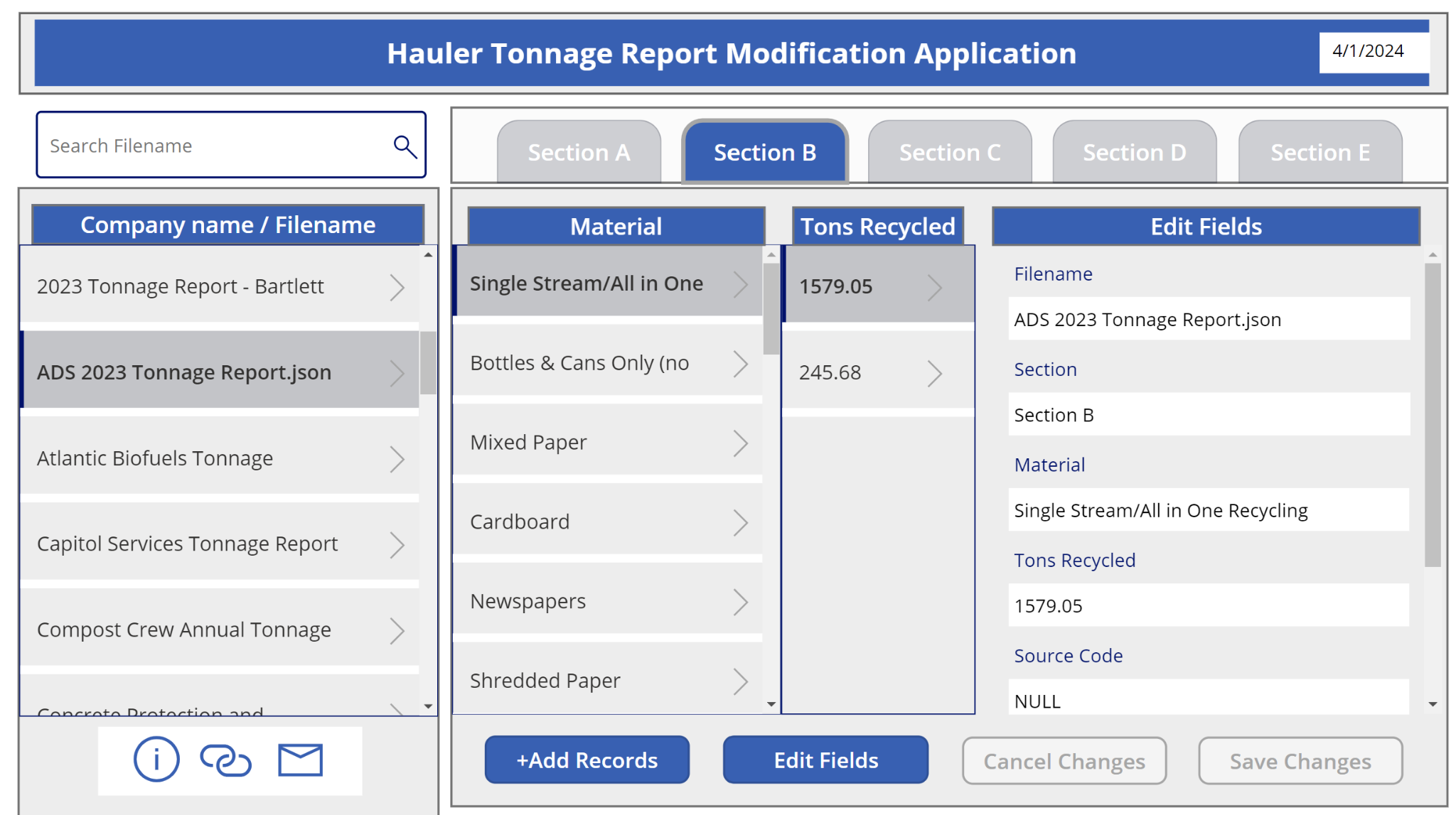
Positioned strategically in the upperright corner of our Dashboard, lies a pivotal feature designed to streamline the data review and editing process for staff members. Leveraging the insights gained from reviewing reports and assessing the risk associated with each file, staff are equipped with the capability to seamlessly transition to a PowerApp interface for data editing. This integration not only enhances efficiency but also empowers staff to swiftly address any discrepancies or inaccuracies identified during the review process.

Central to this workflow is a meticulously craftedPowerApp interface, intuitively designed to facilitate seamless data editing. With user-friendly functionalities and a structured layout, the PowerApp empowers staff to make necessary amendments with ease and precision. Whether correcting inaccuracies, updating information, or adding supplementary details, the PowerApp provides a streamlined platform for data refinement.

Furthermore, to ensure real-time data accuracy and consistency, we implemented a Power Automate workflow seamlessly integrated with our Power BI dataset. This innovative automation triggersdataset refreshing in real time, ensuring that any changes made within the PowerApp are immediately reflected in the Dashboard’s metrics and visualizations. This seamless synchronization between data editing and dashboard updates not only enhances data integrity but also fosters agility in decision-making processes.

By embracing the synergy betweenPowerAppfor data editing andPower Automatefor real-time dataset refreshing, our dashboard ecosystem empowers staff with the tools they need to maintain data accuracy, drive actionable insights, and foster a culture of continuous improvement within the organization.

Managerial Dashboard and Year-to-Year Comparison

In conclusion, this project represents a pure business intelligence endeavor aimed at revolutionizing data management and decision-making processes within the organization. By harnessing the power ofPower BI, PowerApps, and Power Automate, we have constructed a dynamic dashboard ecosystem that empowers staff with comprehensive insights, streamlined data editing capabilities, and real-time data synchronization. From meticulous data cleaning and transformation to proactive hauler compliance monitoring, every aspect of this project has been meticulously crafted to enhance operational efficiency and drive informed decision-making. As we move forward, this business intelligence solution stands as a testament to our commitment to innovation and excellence in navigating the complexities of modern data management.